Stereo Lab
Seven ways to make a sound wider, from opening up a finished mix to turning a mono vocal into a stereo double.
Open the studio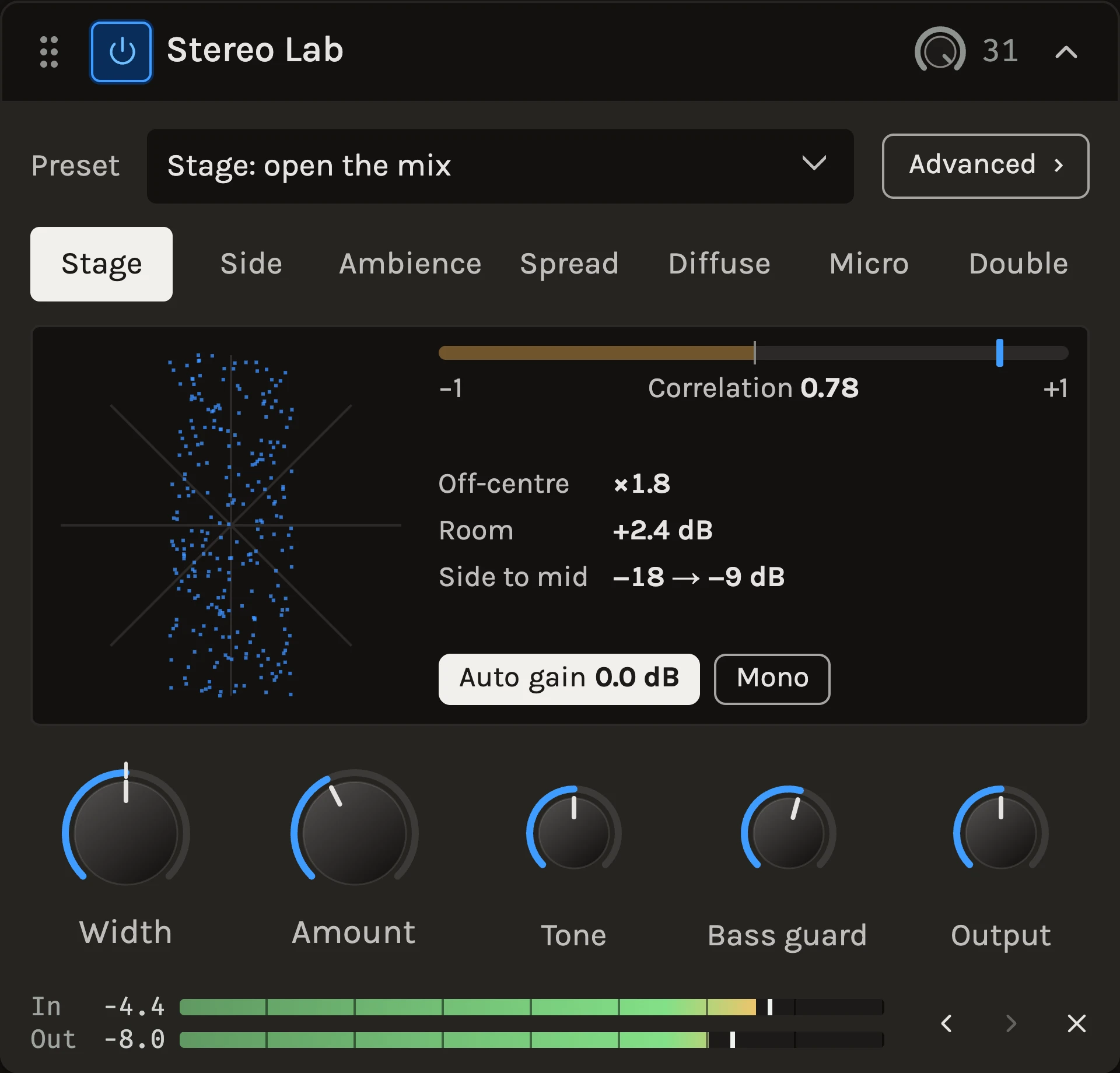
Stereo Lab widens a sound in one of seven ways, each a click away. Three of them work with stereo that is already there, two make stereo out of a mono source, and two make a double. Below the Bass guard nothing changes, so the low end stays where it was. Auto gain keeps the result about as loud as what came in, and a Mono button lets you hear at any moment what a mono speaker would play.
When to use it
Use Stage, Side or Ambience on a stereo bus or a finished mix when the edges should reach further out. Use Spread or Diffuse on a mono vocal, guitar, keys or synth that should fill the space without losing its place in the middle. Use Double for a vocal or guitar that should sound double-tracked, and Micro for a shimmer of detuned copies on backing vocals, guitars or a bus. For a sweeping, moving width, the Chorus is the better tool. To listen to the mid or the sides of any track on their own, use Gain.
Controls
Character
Stage moves what is already off-centre further out and lifts the room, while the phantom centre stays exactly where it is. It needs stereo to work with; on a mono source it has nothing to move. Side is classic mid/side width with an extra lift in the low mids, where panned sounds otherwise feel narrow. Ambience brings out the room in a stereo recording by recirculating the side, and adds a touch of space to mono parts. Spread sends bands of the sound alternately left and right. Diffuse adds a short, scattered copy that sounds roomy rather than echoed, and steps aside on attacks so drums stay sharp. Micro detunes a few cents up on the left and down on the right, each copy slightly late. Double is tape-style double tracking. A copy on each side runs a little behind the original and drifts on its own slow, random wander, so the timing and pitch move like a second take rather than an effect. Switching crossfades, so you can compare while playing.
Side, Ambience, Spread and Diffuse never change the mono sum, apart from the level Auto gain takes off. Stage changes it a little, and in mono the Micro and Double copies become a light chorus. Each character’s tooltip says which applies.
Width
How wide the result is. At 100% each character sounds as designed, at 0% everything is mono, and up to 200% the side is doubled. On a mono source with Spread, Diffuse, Micro or Double, Width is the amount of effect. On a master, small moves go a long way. Most mixes are done somewhere below 130%.
Amount
What it means depends on the character. It sets how far Stage moves off-centre sound and how much it lifts the room, the Side lift below 650 Hz, the size of Ambience and Diffuse, the number of Spread bands from two to thirteen, the Micro detune up to 50 cents, or how loose the Double is, from a tight ±1 ms to a loose ±6 ms of drift. The caption under the display says what it is doing in real units.
Tone
Shapes only what Stereo Lab adds. Turn it down when the width shimmers or sounds tinny; turn it up to put air into the sides of a master. At 0 it is out of the path.
Bass guard
Below this frequency Stereo Lab leaves the sound exactly as it came in, so kick and bass keep their weight and their place in the middle. It starts at 120 Hz. Raise it to 200 Hz or more on guitars and pads; at the far left it is off.
Output
Your own trim after the character and Auto gain, before the shared wet/dry blend.
Auto gain
Wider usually sounds louder, so with Auto gain on Stereo Lab turns its output down by about as much as the current character, Width and Amount add. Comparing characters, or the effect against bypass, is then about width rather than level. The amount comes from measurements made in advance, not from the audio playing, so it never pumps, follows automation and sounds the same in export. It is close on vocals, instruments and mixes. On kick-heavy drums the result can come out a decibel or two quieter, and on a source that is already very wide, Stage and Side can still come out louder. The Auto gain button shows how much it is taking off, or adding when a setting makes the sound quieter.
Wider sounds also peak higher than they sound loud, especially Diffuse, Micro and Double. Auto gain matches loudness, not peaks, so keep a Limiter last on a master.
Advanced
The Advanced button beside the presets opens a column to the right with the selected character’s own controls, the ones that change its sound most, while the main knobs stay in view. Each character keeps its settings when you switch to another and back, and a dot on the button shows that the current one has moved from its defaults.
- Stage. Room is how much of the room Stage finds gets lifted, as a share of what Amount gives. At 0% Stage only moves sources, and below 0 it dries the mix out. Beyond lets sound at the speakers move past them by adding a trace of it in opposite polarity on the other side; check the mono sum when you use it. Centre is the angle around the middle that stays put.
- Side. Corner sets where the low lift stops. A higher corner widens more of the body.
- Ambience. Level is how loud the room is, Decay how long and dense it gets, and Centre room how much of the middle is sent into it. Turn Centre room up to give a mono vocal space of its own, or down to 0 to work only on the stereo that is there.
- Spread. Lean is how far the bands lean. At 100% the outermost ones are fully panned. Contrast turns the smooth change from band to band into a plain split, every band hard to one side.
- Diffuse. Duck sets how readily the copy steps aside on attacks. Turn it down to let drums and consonants spread too.
- Micro. Delay is how far behind the later voice sits, and Level how loud the voices are.
- Double. Dry is the level of the original. At 0 only the two copies play, so one take becomes a double-tracked pair; below the Bass guard the original stays. Delay moves the copies from a tight 3 ms out to a slapback-like 50 ms. Speed is how fast they drift. Faster bends their pitch more, slower keeps them in tune.
Auto gain follows these too. It is measured with one control moved at a time, so with several far from their defaults it can be off by a decibel or so.
Mono
Plays the output summed to mono, as a phone or a club system might. Toggle it while you set Width to hear what survives. While it is on it also reaches playback and export, so turn it off when you are done listening.
Tips
- For a doubled lead vocal, start from Tape double and bring the wet/dry down until the double sits behind the voice. Turn Amount up for a looser, more obviously second take.
- For two takes and no original, try Double-tracked pair, or open Advanced and set Double’s Dry to 0.
- On a master, try Stage first. It leaves the centre alone, so the vocal, kick and snare keep their punch while the sides open up.
- Stereo Lab runs one short window behind, about 21 ms at 48 kHz. Playback and export are lined up for you; you hear the delay only when monitoring a live input through it.
All control ranges 20 controls
| Control | Range |
|---|---|
| Width | 0 to 200% |
| Amount | 0 to 100% |
| Tone | -100 to 100% |
| Bass guard | 20 to 500 Hz |
| Output | -12 to 12 dB |
| Room | -100 to 150% |
| Beyond | 0 to 10° |
| Centre | 0 to 6° |
| Corner | 300 to 1500 Hz |
| Level | 0 to 120% |
| Decay | 0 to 60% |
| Centre room | 0 to 40% |
| Lean | 0 to 100% |
| Contrast | 0 to 100% |
| Duck | 0 to 100% |
| Delay | 1 to 35 ms |
| Level | 0 to 100% |
| Dry | 0 to 100% |
| Delay | 3 to 50 ms |
| Speed | 25 to 400% |
What’s changed
- NewStereo Lab, seven ways to widen · 9 October 2026
A new effect under Space with seven characters. Stage, Side and Ambience open up stereo that is already there, Spread and Diffuse turn a mono source into stereo without changing its mono sum, Micro adds the classic detuned shimmer, and Double makes a tape-style double track. Each character has an Advanced column with the one to three controls that change it most, such as Double's Dry, Delay and Speed. A Bass guard keeps the low end untouched, Auto gain keeps the level about where it was, and a Mono button plays what a mono speaker would.
Keep shaping your sound.
There’s a whole rack to explore.