Gain
Set the level anywhere in a chain, narrow or widen the stereo image, flip polarity, or hear just the mid or the sides.
Open the studio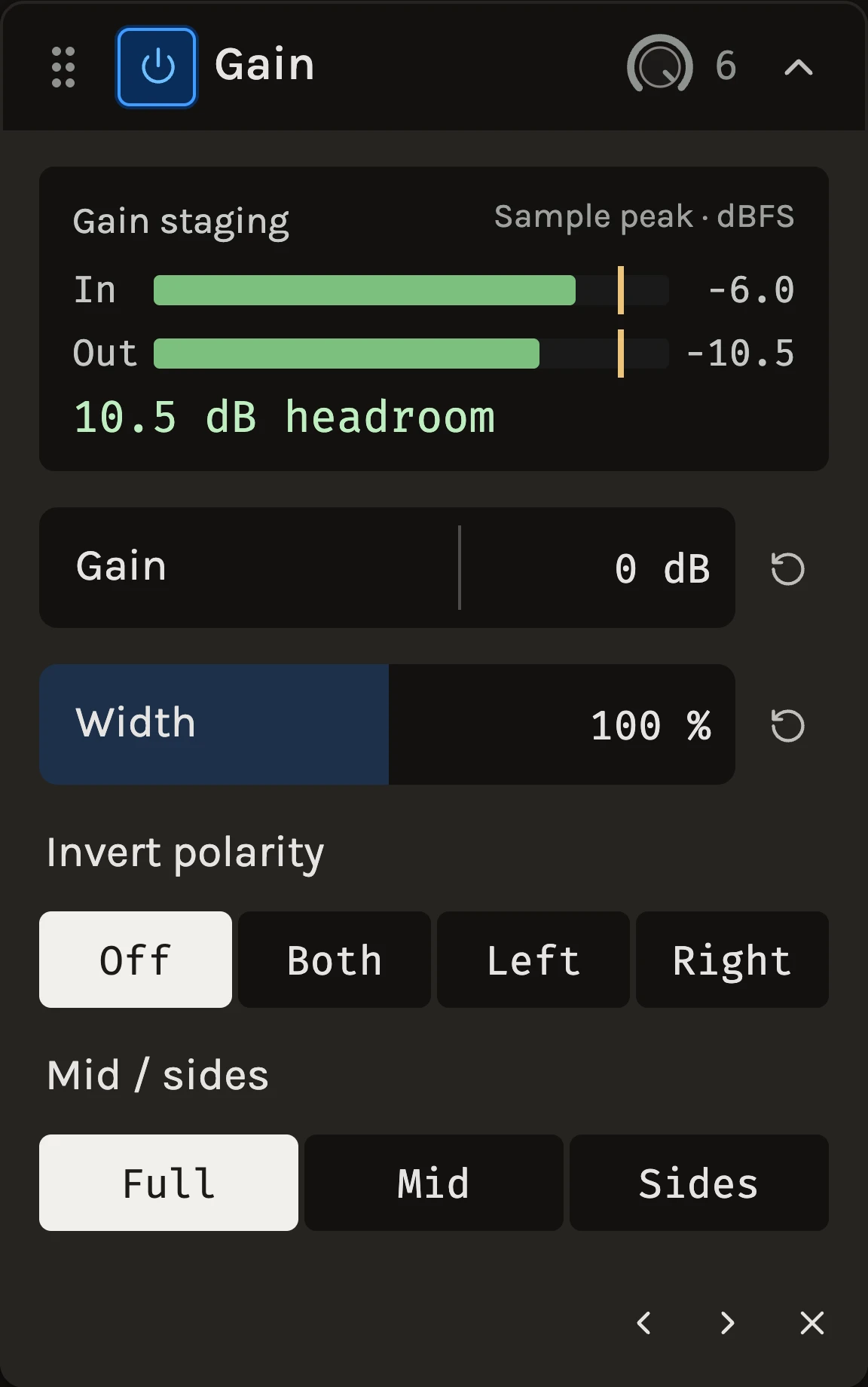
Gain raises or lowers the level at one point in the effects rack, from −36 to +24 dB, and shows the sample peaks going in and coming out on the same scale. It also holds the channel tools a mix keeps reaching for. Width narrows a stereo track toward mono or widens it. Invert polarity flips the waveform, often called flipping the phase. Mid / sides keeps only the center or only the width of a stereo sound. It is the simplest module in the library and one of the most useful: most effects sound different depending on how hard they are driven, and Gain lets you decide that for each of them.
When to use it
Put it in front of a compressor, an amp or a saturator to set how much of the signal crosses their threshold without touching the track fader, which belongs to the mix. Put it after a loud effect to bring the level back where it was so you can compare with and without at the same loudness. Use it on a clip that was recorded too quietly before anything else in the chain sees it. For a ceiling rather than a trim, use the Limiter; to read loudness in LUFS rather than peaks, add the Meter.
Reach for Invert polarity when two microphones hear the same source, such as a snare’s top and bottom mics, a kick’s inside and outside mics, or a bass recorded through a DI and an amp. If one mic pushes while the other pulls, the low end thins out when you play them together. Inverting one of them brings it back. Reach for Mid / sides to hear what sits in the center of a mix and what makes it wide, or to check how a track will sound on a mono speaker.
Controls
Gain
The level change in decibels, applied equally to both channels. Double-click to return to 0 dB.
Width
How wide the stereo image is, from 0 to 200 percent. 0 reads Mono and plays the track in mono on both sides, which is also the quickest way to turn a stereo track into a mono one. 100 leaves the image as it is, and 200 doubles the difference between the channels. The center stays where it is at every setting, so the track sounds the same on a mono speaker however wide you make it. Width works after Invert polarity and before Mid / sides, and changes fade over 10 ms. It is automatable. A mono track has no width, so the control is hidden there.
Gain staging
Two bars, In and Out, show the sample peak before and after the change against a yellow line at 0 dBFS. The readout beneath gives the result in words: how many dB of headroom remain, or how far over full scale the output has gone. Peaks over 0 dBFS inside the chain are not clipped here, but the next stage or the export will see them.
Invert polarity
Off passes the sound as it is. Both turns the waveform upside down on both channels, which is the usual choice for a whole track. Left and Right invert one channel only, for a stereo pair with one side wired backwards. Polarity on its own sounds the same; it matters when the track plays against another one that hears the same source. Play them together, switch between Off and Both, and keep whichever sounds fuller and lower. Switching fades over 10 ms, so you can compare while the song plays.
Mid / sides
Full passes the whole stereo image. Mid keeps what the two channels share and plays it in mono on both sides, half of left plus right. That is also how the track sounds on a phone speaker or a mono club system. Sides keeps only what differs between the channels, with the center removed, so you hear the width on its own, such as reverb tails, doubled guitars and wide synths. Polarity is applied first, so Mid with one side inverted plays the difference instead. On a mono track there are no sides, so only Invert polarity is shown.
Tips
- Aim for peaks around −12 to −6 dBFS going into a character effect, then use its own Drive for the rest; the module after Gain hears the level, not the fader.
- When you want to compare an effect fairly, follow it with a Gain that undoes its level change and toggle the pair together.
- Gain and Width are automatable, so a lane can ride a section’s level into a compressor without moving the mixer fader, or open a chorus wider than its verse. Invert polarity and Mid / sides are set in the panel and are not automated.
- To narrow a busy stereo pad so the lead has room, try Width around 60 percent before reaching for a panner.
- Put a Gain set to Mid at the end of the Master chain, switch it on for a moment, and listen for parts that disappear. Those parts depend on stereo width and will be quiet on a mono speaker.
- On a reverb or delay return, Sides keeps the space out of the center so the lead vocal stays clear.
All control ranges 2 controls
| Control | Range |
|---|---|
| Gain | -36 to 24 dB |
| Width | 0 to 200% |
What’s changed
- ImprovedWidth in Gain · 18 October 2026
Gain now has a Width control from 0 to 200 percent. Lower it to narrow a busy stereo part, set it to 0, where it reads Mono, to play a stereo track in mono, or raise it past 100 to widen the image. The center and the track's sound on a mono speaker stay the same at every setting, and 100, the default, leaves every existing Gain exactly as it was. Width changes fade over 10 ms and can be automated. Search the effect picker for "width" or "mono" to find it.
- NewFlip polarity and hear the mid or the sides in Gain · 9 October 2026
Gain now has Invert polarity, for both channels or either one, and Mid / sides, which keeps only the center of a stereo sound or only its width. Flip a snare's bottom mic or a bass DI against its amp and keep whichever sounds fuller, or switch Master to Mid for a quick mono check. Both fade over 10 ms, so you can compare while the song plays. Search the effect picker or the help for phase, polarity or mono to find them. A Gain left on Off and Full sounds exactly as before.
Keep shaping your sound.
There’s a whole rack to explore.