Vocal rider
Rides the vocal fader for you, toward a level you choose and never further than you allow.
Open the studio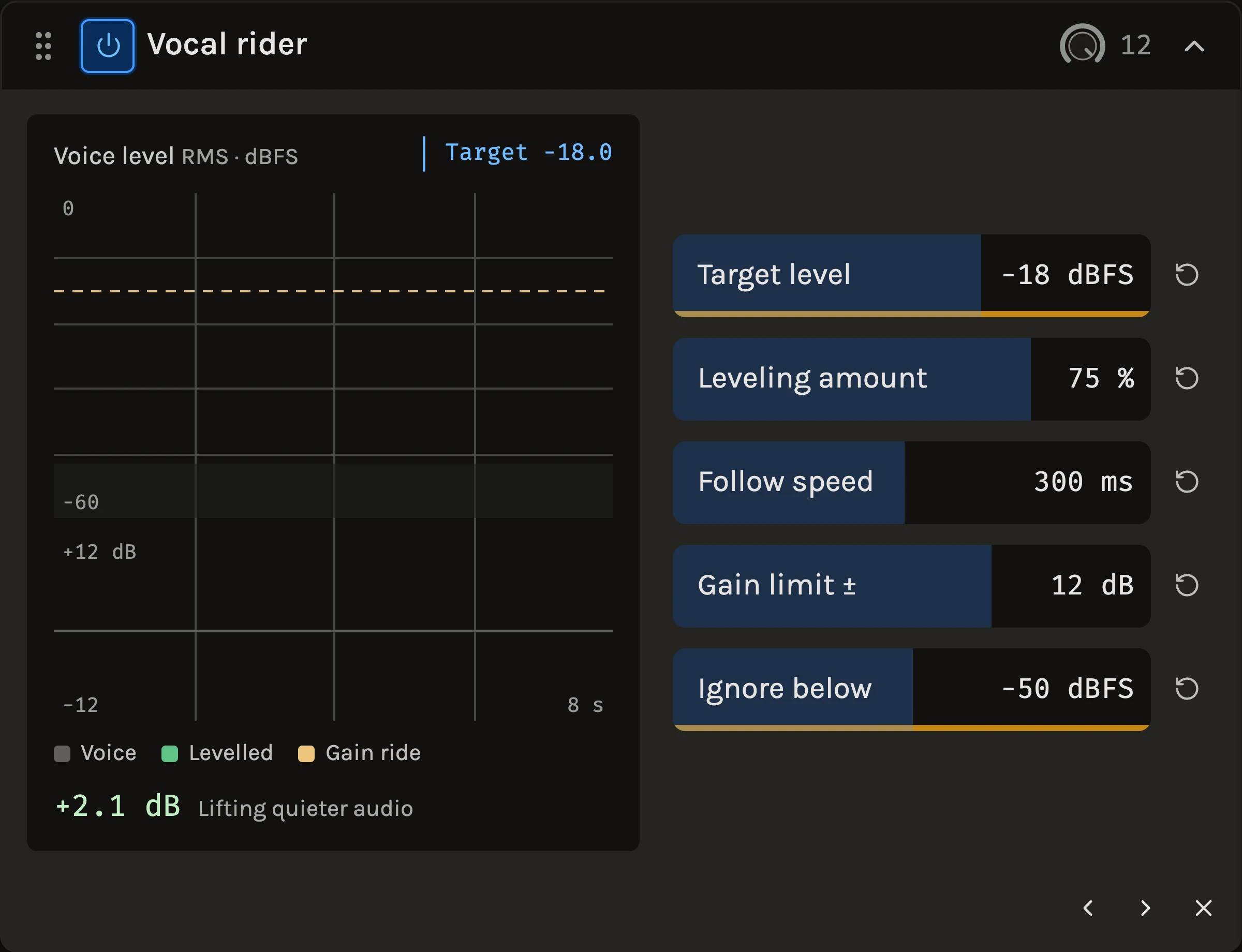
The Vocal rider does what an engineer’s hand does on a vocal fader: it listens to the average level of the voice and nudges the gain up on the quiet lines and down on the loud ones, toward a target you set. It moves slowly enough to leave the shape of each word alone, it stays within a gain limit you choose, and when the voice stops it returns to unity instead of lifting the room noise.
When to use it
Use it on a lead vocal or a spoken part whose lines sit at different levels, before the compressor, so the compressor meets a steadier signal and can work gently. It suits any solo instrument with phrase-to-phrase level changes. For fast control of individual peaks use the Compressor; for sibilance that comes up with the level, the De-esser; for a ride you draw yourself, a volume lane in Automation.
Controls
Target level
The average level the voice is steered toward, −18 dBFS by default. Move it toward the level you want the vocal to sit at in the mix; the meter under the control shows where the voice is now.
Leveling amount
How far toward the target the rider goes. Zero leaves the voice alone, 100% aims straight for the target, and the default 75% keeps a little of the performer’s own dynamics.
Follow speed
How quickly the gain follows the voice. Lower values follow faster and even out shorter phrases; higher values move gently and only correct whole lines. Start around the default 300 ms.
Gain limit ±
Under Advanced, how far the fader may lift or lower, in either direction. The default 12 dB covers most performances; a smaller limit keeps the ride discreet.
Ignore below
Also under Advanced: below this level the rider treats the signal as silence and returns toward unity gain, so breaths, room tone and the gap before the first line are not pulled up. Set it above the noise floor and below the quietest sung note.
The history display shows the last eight seconds: the voice level in grey, the levelled output as a line, the target dashed, and the applied gain in the lower lane, so you can see the correction pattern as it happens.
Tips
- Set Ignore below first, with the track soloed in a gap: if the gain lane climbs during silence, raise it.
- If the ride is audible as pumping, raise Follow speed before lowering Leveling amount; slower movement usually fixes it with the correction intact.
- Follow it with a compressor set to a light ratio. The rider handles the lines, the compressor handles the syllables.
All control ranges 5 controls
| Control | Range |
|---|---|
| Target level | -40 to -6 dBFS |
| Leveling amount | 0 to 100% |
| Follow speed | 50 to 2000 ms |
| Gain limit ± | 0 to 18 dB |
| Ignore below | -80 to -20 dBFS |
What’s changed
- NewThe Vocal rider shows eight seconds of what it did · 21 September 2026
A history graph draws the incoming voice level, the levelled output, the target and the gain the rider applied, so you can see whether it is working before you hear it.
Keep shaping your sound.
There’s a whole rack to explore.