Pitch correction
Pull sung notes onto a scale, as gently or as hard as the song wants.
Open the studio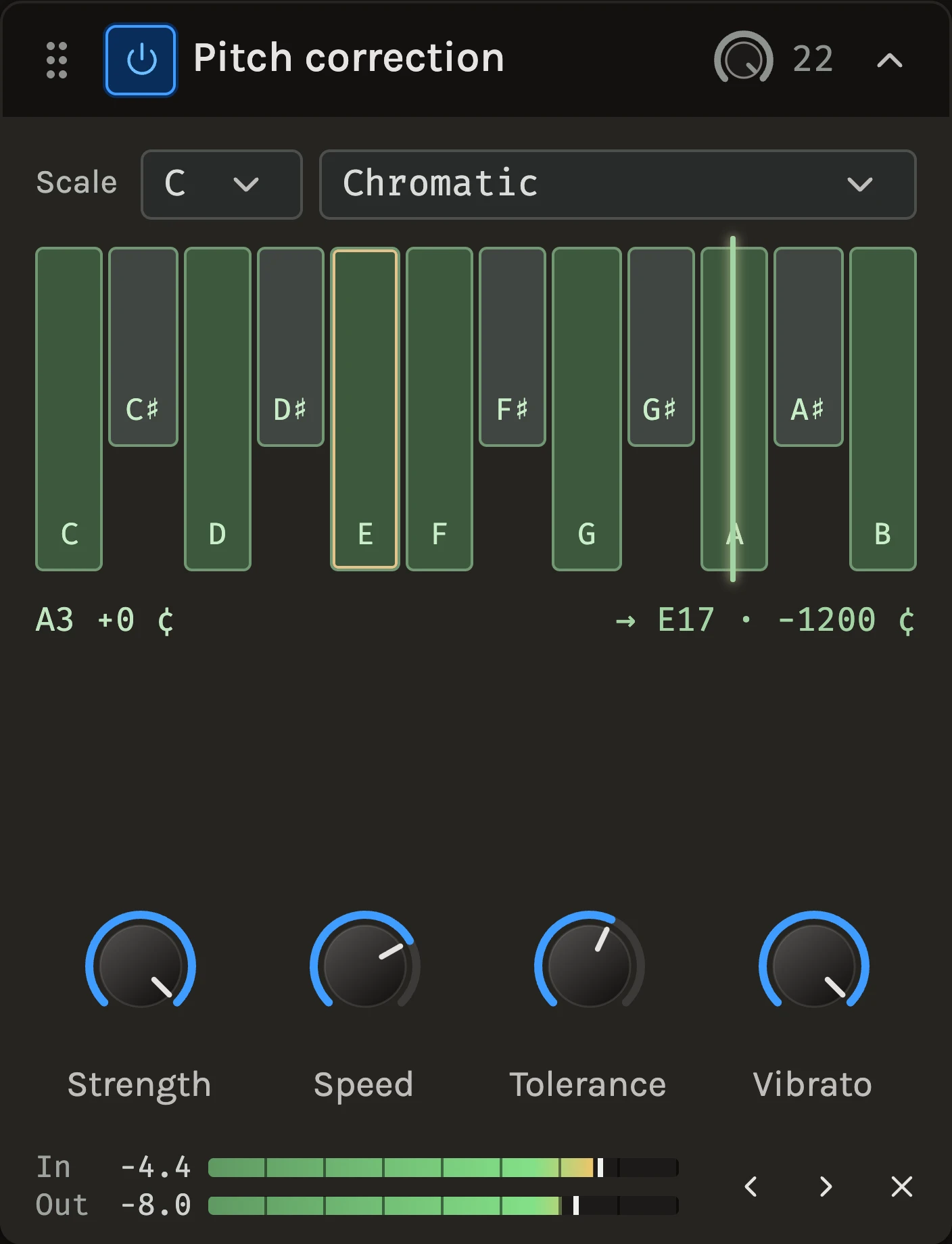
Pitch correction listens to a single voice or instrument and moves each note toward the nearest note of a scale you choose. At its default it is gentle: every note is pulled to the nearest semitone over 90 ms, the singer’s vibrato passes through untouched and only the centre of each note is corrected. Turn Speed down and Vibrato to zero and it becomes the hard-tuned effect.
When to use it
Use it on a lead vocal that is nearly there, on a bass or a lead line that drifts, or deliberately as an effect. It needs one note at a time: chords, doubled vocals and a full mix are left alone. While audio plays, the note strip shows a gold marker at the detected pitch and a green marker at the corrected one, with a readout of the note, its offset in cents and the shift being applied. To move all notes by an interval, use the Pitch shifter; to check tuning without changing anything, add the Tuner.
Controls
Scale
Pick a Root note and a Scale: Chromatic, Major, Minor, Harmonic minor, Dorian, Mixolydian, Major pentatonic, Minor pentatonic or Blues. The twelve-note strip shows the result: lit notes are targets, unlit notes are pulled to the nearest lit one. Click any note to toggle it and the scale reads Custom. Choosing the song’s scale rather than Chromatic stops a note that sits between two semitones from landing on the wrong one.
Strength
How far each note is pulled toward its target. 100% lands on the note; 50% halves the error and leaves some of the performance’s own intonation.
Speed
Time to reach the target, 1 to 500 ms. 1 ms snaps for the hard-tuned sound; 200 ms and above leaves slides and scoops mostly alone. The default 90 ms sounds natural on most voices.
Tolerance
How far a note may be from the nearest target and still be pulled in, in cents. 360 reaches every note in any scale; a smaller value leaves a deliberate blue note or a wide slide alone. A single lit note with 600 cents pulls everything to that note.
Vibrato
How much of the sung vibrato and drift to keep. At 100% only the centre of each note is corrected; at 0% the movement is flattened as well, which with a fast Speed is the hard-tune sound.
Tips
- Set the scale first. Chromatic corrects to the nearest semitone, which is right for a singer who is close but wrong for one who is a quarter-tone out.
- For an invisible correction, leave Speed at 90 ms and lower Strength to around 70%: the notes centre and the singer still sounds like themselves.
- The correction adds 20 ms of delay that the engine compensates in playback and export; while recording with monitoring you will hear it.
All control ranges 4 controls
| Control | Range |
|---|---|
| Strength | 0 to 100% |
| Speed | 1 to 500 ms |
| Tolerance | 10 to 600 ¢ |
| Vibrato | 0 to 100% |
Keep shaping your sound.
There’s a whole rack to explore.