Dr. Tape Single Sampler
Drop a sound in and play it. The full Sampler is one click away when you need more.
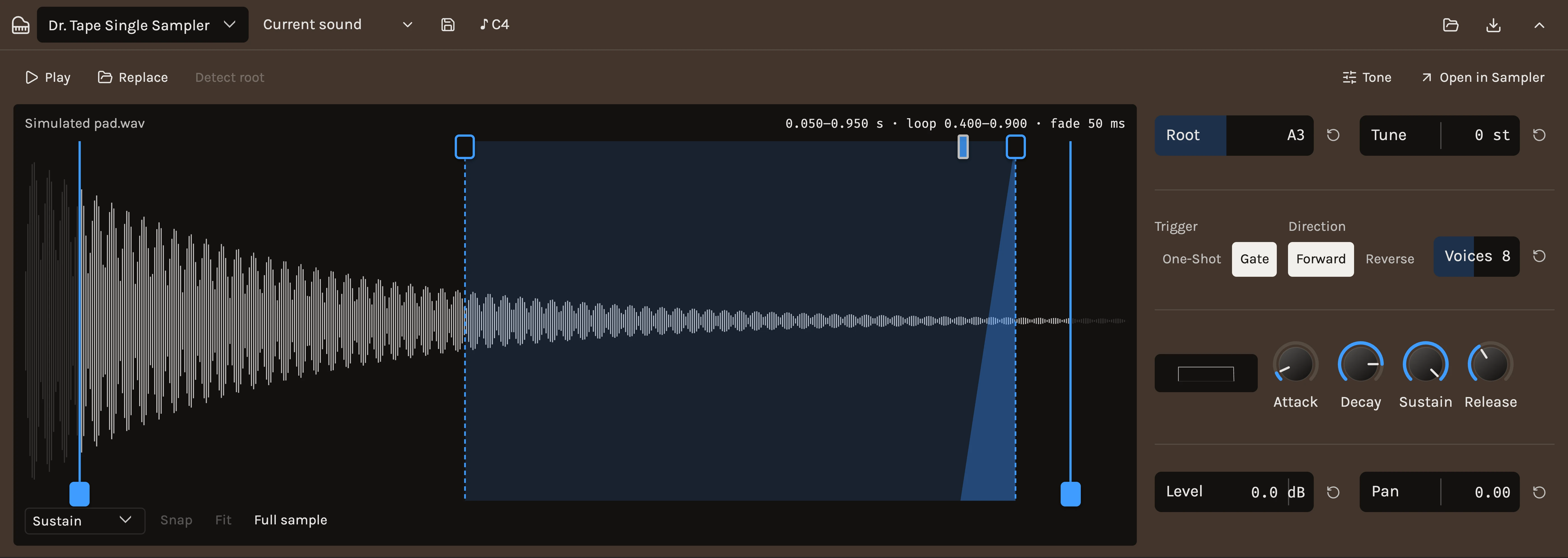
The Single Sampler plays one recording. Drop a WAV or FLAC file onto it, or choose one with the button, and every key plays it transposed from its Root note. The waveform fills the left of the panel with the same trim and loop handles as the Sampler, and the controls you reach for first stand beside it in one column. The sample is stored inside the project file, so a saved project carries it.
When to use it
Use it for a vocal chop, a found sound, a single hit or any one recording you want to play as an instrument without mapping anything. When one sample turns into several, or you want velocity layers, choke groups or a kit, press Open in Sampler. The full Sampler opens on the same track with this sample and all of its settings carried over, and the track’s automation lanes for those settings and Output follow them.
Controls
Play
Hold Play, or hold the pointer on the waveform, to hear the sample at its Root note. Every sounding note shows as a line moving over the waveform, so you can watch a loop repeat, a ping-pong turn around, or a reversed sample run backwards.
Root and Tune
Root is the note the recording sounds at; other keys transpose from it. Detect root listens to the sample and sets Root for you, which works on anything with a clear pitch. Tune shifts the whole instrument in semitones; hold Shift while dragging for cents.
Trigger, Direction and Voices
Trigger chooses One-shot, which plays to the end whatever the note length, or Gate, which follows the key and releases on note-off. Direction plays the sample Forward or in Reverse. Voices is how many notes may sound at once; 1 makes each new note cut the last.
Loops
Choose Sustain, Continuous or Ping-pong under the waveform and drag the loop handles on its upper edge. Sustain loops while the key is down and plays the rest on release. The crossfade handle beside the loop end smooths the join. Snap, off until you turn it on, settles a handle you let go on the nearest zero crossing within a few pixels, another way to keep the join quiet. A loop needs the sound to follow the key, so switching one on sets Trigger to Gate and the toolbar says so. Set Trigger back to One-shot and the loop is drawn faint with a note beside the loop choice; One-shot plays straight through it until you choose Gate again.
Envelope
Attack, Decay, Sustain and Release shape the level of every note. Start with the sample’s own shape, then shorten Release for tighter stops or lengthen Attack to soften a hard start.
Mix
Level and Pan place the instrument.
Tone
Press Tone for a panel beside the waveform with three blocks. Filter is Off, Low, High or Band with Cutoff and Resonance; its Envelope lets the level envelope move the cutoff and its Velocity opens it further on hard notes. Pitch envelope has Amount, how far the pitch starts from the tuning, and Decay, how fast it settles, which gives a drum its drop. Velocity has Amount, how much a note’s strength changes its level, and a Soft, Linear or Hard Curve.
From the song
Drag an audio clip out of the sequencer and drop it on the waveform, or choose Send to sampler in the clip’s menu and pick this track. The clip is captured as it sounds, with its trims, loop repeats, gain, fades and chosen takes, and replaces the sample while every setting stays. The track’s effects are left out unless With the track’s effects is ticked in the menu. One ⌘Z puts the previous sample back.
This is also how to record a sample. Arm an audio track and record while the song plays, so you can sing or play along with it, cut the take into clips, and send the one you want here. There is no recorder inside the instrument, and nothing is lost by that: the take stays on its track, with its other clips, for the next sound.
Tips
- Replace loads another file in place of this one and keeps every setting, so a patch you like can try several sounds.
- A file that already carries loop points starts looped.
- The starter presets Pad, Pluck and One-shot shape whatever sample is loaded; they never change the sample itself.
Control ranges
Sample
| Control | Range | What it does |
|---|---|---|
| Trigger | One-shot · Gate | One-shot plays to the end of the sample whatever the note length. Gate follows the note and releases on note-off. |
| Direction | Forward · Reverse | |
| Start | 0 to 1, starts at 0 | Where playback begins, as a fraction of the sample. |
| End | 0 to 1, starts at 1 | Where playback stops, as a fraction of the sample. |
| Attack | 0.001 to 5 s, starts at 0.001 s | |
| Decay | 0.005 to 20 s, starts at 5 s | |
| Sustain | 0 to 1, starts at 1 | |
| Release | 0.002 to 10 s, starts at 0.05 s | Fade after note-off for Gate pads, and after a choke. |
| Pitch envelope | -24 to 24 st, starts at 0 st | Semitones the pitch starts away from the tuning before settling. |
| Pitch decay | 0.005 to 2 s, starts at 0.08 s | |
| Filter | Off · Low · High · Band | |
| Cutoff | 30 to 20000 Hz, starts at 20000 Hz | |
| Resonance | 0.5 to 8 Q, starts at 0.7 Q | |
| Envelope | -5 to 7 oct, starts at 0 oct | The amplitude envelope moves the cutoff by this many octaves. |
| Velocity | 0 to 1, starts at 1 | How much note velocity changes the level. Zero plays every hit at full level. |
| Curve | Soft · Linear · Hard | Soft keeps quiet hits louder; Hard needs a firm hit for full level. |
| Choke group | 0 to 8, starts at 0 | Pads sharing a group above zero cut each other off, like closed and open hats. |
| Voices | 1 to 16, starts at 8 | Hits of this pad sounding at once. One makes a retrigger cut the previous hit. |
| Layers | Cycle · Random | How samples sharing a velocity range take turns. |
| Tune | -24 to 24 st, starts at 0 st | |
| Level | -60 to 12 dB, starts at 0 dB | |
| Pan | -1 to 1, starts at 0 |
Instrument
| Control | Range | What it does |
|---|---|---|
| Output | -36 to 12 dB, starts at -6 dB |
4 factory presets.
See also
Changes
- NewThe Single Sampler · 8 October 2026
A small sampler for one sound. Drop a file in, play it across the keyboard, set its Root by ear or with Detect root, trim and loop it on the waveform, and shape it with the settings stacked beside it. Tone opens a panel with the filter, pitch envelope and velocity response, and Open in Sampler carries the sample and its settings into the full Sampler when one sound turns into many.